
In today’s digital landscape, one of the most critical decisions a business faces is where to host its data and applications. The core of this decision often boils down to a fundamental choice: cloud vs local servers. This isn’t just a technical debate; it’s a strategic one that impacts your budget, security, and ability to grow.
Understanding the difference between a server in your office and a virtual server in a global data center is key to making an informed choice. This comprehensive guide will break down the pros, cons, and perfect-use scenarios for each, moving beyond the hype to give you a clear-eyed view.
What Are We Actually Comparing?
Before diving into the comparison of cloud versus local servers, let’s define our terms.
- Local Servers (On-Premises): This refers to physical computer servers that you own and host on your business premises. You are responsible for purchasing the hardware, maintaining it, powering it, cooling it, and securing it.
- Cloud Computing: This refers to accessing computing services—servers, storage, databases, networking—over the internet (“the cloud”) from a provider like Amazon Web Services (AWS), Microsoft Azure, or Google Cloud Platform. You rent these resources on-demand.
Think of it as the difference between building your own power plant (local) versus buying electricity from a utility company (cloud). This analogy helps frame the core differences in cost, control, and responsibility.
Key Differences: Breaking Down the Cloud vs Local Servers Debate
To make the right choice, you need to compare these solutions across several key business dimensions.
Cost Structure: Capital Expenditure vs. Operational Expenditure
This is one of the most significant differentiators in the cloud versus on-premises servers discussion.
- Local Servers: Require a large upfront capital expenditure (CapEx). You must purchase the server hardware, which can cost thousands of dollars, plus software licenses, and potentially the infrastructure to support it (e.g., cooling, backup power). This is a significant initial investment.
- Cloud Computing: Operates on an operational expenditure (OpEx) model. You pay a monthly or annual subscription fee based on the resources you use. There is little to no upfront cost, making it more accessible for small and growing businesses.
Verdict: The cloud offers a lower barrier to entry, while local servers can become more cost-effective over the long term for predictable, heavy workloads.
Scalability and Flexibility: Planning for Growth
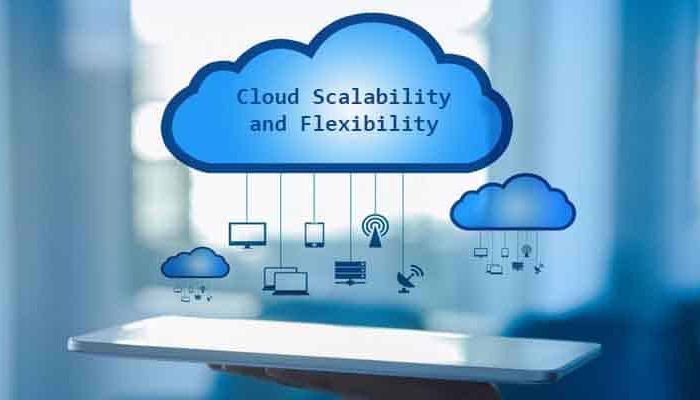
How easily can your IT infrastructure adapt to change?
- Local Servers: Scaling requires purchasing, installing, and configuring new physical hardware. This process is slow, expensive, and requires careful long-term planning. If you experience unexpected growth, your server can become a bottleneck.
- Cloud Computing: Scalability is its greatest strength. You can increase or decrease resources (CPU, RAM, storage) with a few clicks, often in real-time. This “elasticity” is perfect for businesses with fluctuating demands, like seasonal e-commerce sites.
Verdict: The cloud wins decisively on scalability, offering unparalleled flexibility.
Security and Control: Who Guards the Castle?
The security debate in the cloud vs local server conversation is often misunderstood.
- Local Servers: You have complete physical and administrative control over your data and security systems. This can be appealing, but it also means the entire burden of security—from firewalls to intrusion detection—falls on your IT team. You are responsible for every potential vulnerability.
- Cloud Computing: Security is a shared responsibility. The cloud provider secures the underlying infrastructure (the data center, the hypervisor), while you are responsible for securing what you put in the cloud (your data, applications, and access controls). Major providers invest billions in security, often offering a level of protection most SMBs couldn’t afford on their own.
Verdict: Local servers offer total control, but that doesn’t always mean better security. The cloud provides enterprise-grade infrastructure security, shifting your focus to access and data management.
Performance and Reliability: The Need for Speed
- Local Servers: Can offer superior performance for localized tasks because data doesn’t have to travel over the internet. However, reliability is dependent on your own infrastructure. A power outage or hardware failure can mean significant downtime unless you have invested in robust backups and redundancy.
- Cloud Computing: Performance can be affected by your internet connection speed and latency. However, cloud providers offer immense reliability through geographically redundant data centers. If one data center fails, your service can automatically failover to another, ensuring near-perfect uptime.
Verdict: Local servers can be faster for internal, data-intensive workflows, while the cloud is typically more reliable and resilient.
Maintenance and IT Overhead
- Local Servers: Require a dedicated IT staff for ongoing maintenance, troubleshooting, updates, and patches. This adds to your operational costs and can divert IT talent from strategic projects.
- Cloud Computing: The provider handles all hardware maintenance, firmware updates, and underlying software patches. Your IT team is freed up to focus on higher-value tasks that directly benefit the business.
Verdict: The cloud significantly reduces the IT burden of hardware maintenance.
The Verdict: When to Choose Which Solution?
The choice in the cloud vs local servers debate isn’t about which is universally better, but which is better for your specific situation.
Choose Local Servers If:
- You Have Predictable, High-Performance Needs: You run complex, data-heavy applications that require constant, low-latency access (e.g., video editing studios, scientific modeling).
- Strict Data Sovereignty and Compliance: You operate in an industry with regulations that mandate data must be physically stored within a specific geographic location.
- You Have a Limited Internet Connection: Your business is in an area with unreliable or slow internet, making cloud access impractical.
- You Have Legacy Systems: You rely on older software that cannot be easily migrated or virtualized.
Choose Cloud Computing If:
- Your Business is Growing or Has Fluctuating Demand: You need the ability to scale resources up and down quickly and cost-effectively.
- You Want to Minimize Upfront Costs: You prefer a predictable monthly subscription over a large capital investment.
- Your Team is Remote or Distributed: Your employees need to access systems and data from multiple locations securely.
- You Lack a Large In-House IT Team: You want to offload the burden of hardware maintenance and security patching to experts.
Beyond the Basics: An Emerging Trend – The Hybrid Approach
Many businesses are discovering that the cloud vs local servers discussion doesn’t have to be binary. The hybrid model is becoming increasingly popular, where some workloads and data reside on a local server for performance or compliance reasons, while others are hosted in the cloud for scalability and accessibility.
This “best of both worlds” approach allows for greater strategic flexibility, letting businesses place each workload in the environment that makes the most sense.
Read more about Cybersecurity Tips for Small Businesses You Didn’t Know About
Making Your Decision
The journey through the cloud vs local servers landscape reveals that the right choice hinges on your business’s unique needs regarding budget, growth trajectory, and technical capabilities. By carefully weighing the factors of cost, control, scalability, and security, you can move beyond the hype and select the IT foundation that will power your business’s success for years to come.
Leave a Reply