Tag: developer tools

  • Productivity Apps for Developers: The Hidden Tools You Need to Know

    Productivity Apps for Developers: The Hidden Tools You Need to Know

    In the relentless pursuit of clean code and efficient workflows, developers are always on the lookout for tools that can shave seconds off a build or bring clarity to a complex system. While staples like VS Code, Slack, and Jira dominate the conversation, a suite of lesser-known applications is quietly revolutionizing how developers work. This guide uncovers those hidden gems—innovative productivity apps for developers designed to enhance focus, streamline collaboration, and automate the mundane, ultimately freeing you to do what you do best: create.

    The Challenge of Developer Productivity

    Developer productivity isn’t just about typing speed. It’s about maintaining flow state, minimizing context-switching, managing cognitive load, and effectively collaborating within a team. The right productivity tools for developers address these very pain points, integrating seamlessly into your environment to reduce friction. The following categories of applications go beyond the obvious choices to offer unique advantages.

    Read more about Best Cloud Storage Options for Businesses You Didn’t Know About

    Under-the-Radar Productivity Apps for Development Workflows

    1. Code-Centric & IDE Enhancements

    These apps for developer productivity work directly within or alongside your coding environment to supercharge your interaction with the codebase.

    Windsurf (windsurf.dev)

    Forget traditional, linear code completion. Windsurf is an AI-powered editor that acts like a pair-programming copilot for your entire codebase. It understands your project’s context at a deep level.

    • Why It’s a Hidden Gem: It goes beyond single-line suggestions, offering features like generating entire functions from a comment, explaining complex code blocks in plain English, and performing project-wide refactors through natural language commands. It’s a paradigm shift from autocomplete to AI-driven development.
    • Best For: Developers working on large, existing codebases who need to navigate, understand, and modify code quickly.

    Cursor (cursor.sh)

    Cursor is an editor built for the AI age, positioning itself as the successor to VS Code with deeply integrated AI capabilities. It stands out among modern Productivity apps for developers, designed as a first-principles rethink of how an IDE should work with an AI agent.

    • Why It’s a Hidden Gem: Its “Agent Mode” can tackle complex tasks like implementing a new feature across multiple files by understanding your instructions. It has a built-in understanding of your project’s architecture, making its suggestions and edits remarkably coherent.
    • Best For: Developers and teams ready to adopt an AI-native workflow, moving from AI as a helper to AI as an integral part of the editor.

    2. Collaboration & Knowledge Management

    Moving beyond generic shared drives, these tools are built for the specific way technical teams share information and make decisions.

    Tuple (tuple.app)

    For pair programming, screen sharing in Zoom or Teams is a poor substitute for being side-by-side. Tuple is a tool built exclusively for pair programming, with near-zero latency and features like multi-cursor control.

    • Why It’s a Hidden Gem: Its performance is exceptional, making remote pairing feel local. Features like per-app audio isolation (so you can listen to music while your pair hears only your voice) show a deep understanding of developers’ needs.
    • Best For: Remote teams that practice frequent pair programming or mob programming sessions.

    Fibery (fibery.io)

    While Notion is popular, Fibery is a “build-your-own-workflow” platform created by a developer for complex product development. It connects requirements, tasks, code commits, and feedback in a deeply relational database.

    • Why It’s a Hidden Gem: Its flexibility is unparalleled. You can model your entire development process—from a user story through to deployment—without fighting a pre-set structure. It’s a powerhouse for technical product managers and dev leads.
    • Best For: Product-driven engineering teams that need a single source of truth connecting business goals with technical work.

    3. Focus, Automation & System Enhancement

    These productivity apps for software developers tackle the environmental and psychological factors that impact output.

    Focusmate (focusmate.com)

    Combating procrastination and isolation can be a major hurdle. Focusmate, one of the more unique Productivity apps for developers, uses virtual co-working sessions. You book a 50-minute video session with a partner worldwide, state your goal at the start, and work in silent accountability.

    • Why It’s a Hidden Gem: It leverages social accountability, a powerful force often missing for remote developers. The simple act of declaring your goal to another person dramatically increases the likelihood of deep work.
    • Best For: Solo developers, freelancers, or anyone struggling with self-directed workdays and procrastination.

    Raycast (raycast.com)

    If you live in your terminal, you’ll love Raycast. It’s a blazing-fast launcher for macOS and one of the most powerful Productivity apps for developers, going far beyond Spotlight. With its extensive plugin ecosystem and scripting capabilities, it can become the command center for your entire machine.

    • Why It’s a Hidden Gem: Developers can control their IDE, manage GitHub pull requests, control music, run scripts, and calculate hashes—all without touching the mouse. Its extensibility makes it a critical productivity app for automating daily desktop workflows.
    • Best For: macOS power users who want to streamline application switching, script execution, and tool access through a keyboard-first interface.

    Implementing New Productivity Apps for Developers: A Strategic Approach

    Introducing new Productivity apps for developers can be disruptive. Follow this strategy for smooth adoption:

    1. Identify the Friction Point: Don’t adopt tools for their own sake. Is the bottleneck context-switching? Knowledge silos? Slow testing? Choose an app that directly targets that pain.
    2. Solo Pilot First: Experiment with the tool individually before proposing it to the team. Document your time savings or efficiency gains.
    3. Advocate with Evidence: When proposing a team-wide tool like Tuple or Fibery, present a clear case: “Using X for our mob sessions reduced environment-setup time by 15 minutes per session.”
    4. Integrate Gradually: Don’t overhaul your entire stack at once. Integrate one new productivity app for developers at a time, allowing the team to master it before adding another.

    Conclusion: Elevating Your Development Game

    The landscape of productivity apps for developers is vast and extends far beyond the usual suspects. By exploring tools like Windsurf for AI-assisted coding, Tuple for seamless pairing, or Raycast for system control, you can construct a personalized toolchain that addresses your unique workflow challenges. The goal is not to use more apps, but to use smarter ones—applications that fade into the background while actively reducing cognitive overhead and friction. Invest time in exploring these hidden gems; the return in sustained focus, cleaner code, and professional satisfaction will be well worth it. Your most productive workflow might just be one unknown app away.

  • React vs Vue vs Angular: The Ultimate 2025 Decision Guide

    React vs Vue vs Angular: The Ultimate 2025 Decision Guide

    The React vs Vue vs Angular debate is more than a technical comparison; it’s a strategic decision that shapes your team’s velocity, your product’s architecture, and your company’s long-term technical debt. For developers and decision-makers navigating the modern frontend landscape, the choice can feel overwhelming.

    But in 2025, the question has evolved. It’s no longer about which is universally “best,” but which is the optimal fit for your specific team, project, and future goals. This in-depth guide moves beyond surface-level features to deliver a nuanced comparison of React vs Vue vs Angular, providing the technical depth and strategic insight needed to make a confident choice.

    Understanding the Core Philosophies in 2025

    Before analyzing code, we must understand the fundamental design philosophy behind each player in the React vs Vue vs Angular triad. This mindset informs everything from developer experience to long-term maintainability.

    React: The Unified Ecosystem with Lean Core

    Maintained by Meta (formerly Facebook), React remains a library for building user interfaces. Its core philosophy is “Learn Once, Write Anywhere.” React itself is deliberately lean, focusing solely on the view layer. However, the 2025 landscape is defined by the React Ecosystem—a powerful, albeit fragmented, collection of meta-frameworks. Next.js (from Vercel) has become the de facto standard for production, with Remix (from Shopify) as a strong contender. This means choosing React often means choosing Next.js, fundamentally changing the development model.

    Vue: The Progressive Full-Stack Framework

    Created by Evan You, Vue’s hallmark has always been its gentle learning curve and progressive nature. In 2025, this philosophy has matured into a cohesive full-stack vision. While you can still use Vue as a standalone library, the official stack—Vue 3 with Vite, Pinia for state management, and Nuxt as the full-stack framework—provides a powerfully integrated and opinionated experience. Vue’s focus on developer ergonomics and built-in optimization (like the Composition API) makes it incredibly efficient.

    Angular: The Enterprise-Grade Platform

    Angular, backed by Google, is a full-featured, opinionated framework for building scalable applications. Its philosophy is “Batteries-Included.” You don’t need to choose a routing library or state manager; Angular provides a standardized, powerful way to build everything. The 2025 Angular is defined by its relentless focus on developer tooling, strict type safety with TypeScript, and powerful features like Signals for fine-grained reactivity and Standalone Components for a streamlined authoring experience.

    A Technical Deep Dive: The 2025 Landscape

    React vs Vue vs Angular

    Let’s dissect the critical factors that will define your daily development experience in the React vs Vue vs Angular decision.

    Read more about The Blockchain Future: Moving Far Beyond Cryptocurrency

    Learning Curve & Developer Onboarding

    • React: The initial learning curve remains moderate. You must grasp JSX, components, and hooks. The true complexity, however, lies in the ecosystem. Mastering a production-grade React app requires understanding Next.js’s App Router, Server Components, and a state management strategy. This can lead to decision fatigue and a steeper overall learning path for full-stack development.
    • Vue: Continues to offer the most gentle onboarding. The template syntax is intuitive for those familiar with HTML, and the Composition API (while a mental shift from the Options API) provides a powerful and flexible pattern that scales beautifully. The official toolchain is cohesive and well-documented, reducing the “what to learn next” ambiguity.
    • Angular: The initial learning curve is still the steepest, but the payoff is a highly standardized environment. The mandatory use of TypeScript, dependency injection, and modules can be daunting. However, for 2025, Angular has simplified its model with Standalone Components, reducing boilerplate. Once a team is over the initial hump, the opinionated structure allows new developers to become productive quickly within established patterns.

    Architecture & Data Flow

    • React: Data flow is unidirectional (parent to child via props). The mental model is straightforward, but managing state and side effects in large applications relies heavily on developer discipline and third-party libraries like Redux Toolkit, Zustand, or TanStack Query. The introduction of Server Components in Next.js creates a new, hybrid mental model for data fetching and composition.
    • Vue: Employs a reactive, unidirectional data flow. Vue’s core reactivity system is its “magic sauce”—it automatically tracks dependencies, making state updates intuitive and performant. The Pinia state management library (the official successor to Vuex) is simple to integrate and use, offering a less boilerplate-heavy experience than Redux.
    • Angular: Uses a highly structured, dependency-injected architecture. Data flow can be both unidirectional and bidirectional (via two-way binding with [()] syntax). The recent addition of Signals (as a reactive primitive) provides a fine-grained reactivity model that is simpler and more performant than Zone.js’s default change detection for many use cases, marking a significant evolution in Angular’s architecture.

    Performance & Bundle Size in 2025

    All three frameworks are highly performant, but their strategies differ.

    • React (with Next.js): Performance is heavily tied to the meta-framework. Next.js excels with its App Router, which supports Server-Side Rendering (SSR), Static Site Generation (SSG), and Incremental Static Regeneration (ISR) by default. The use of React Server Components can dramatically reduce the JavaScript bundle sent to the client. However, optimizing a client-heavy React SPA still requires careful use of useMemouseCallback, and React.memo.
    • Vue (with Vite/Nuxt): Vue 3’s compiler-based optimizations (like hoisting static nodes and patch flags) make it incredibly fast out-of-the-box. Combined with Vite’s lightning-fast build tooling and Nuxt’s own powerful SSR/SSG capabilities, Vue applications consistently deliver excellent performance metrics with minimal manual optimization.
    • Angular: The Ivy renderer (and subsequent updates) eliminated previous bundle size concerns. Angular’s new Signals offer a path to even better performance by enabling fine-grained updates, meaning only the components that depend on changed state are re-rendered, without the need for a virtual DOM diff. Its built-in code-splitting and AOT (Ahead-of-Time) compilation ensure optimized production bundles.

    Unique Insights: Beyond the Hype

    To add distinctive value, let’s look at some lesser-discussed factors in the React vs Vue vs Angular debate.

    • The “Implicit Framework” of React: While React is a library, the dominance of Next.js has created an implicit, de facto framework. The innovation and pace are now set by Vercel, which can be a double-edged sword: you get a brilliant, integrated experience but also cede some architectural control to a third-party company.
    • Vue’s Corporate Backing is Stronger Than You Think: While often portrayed as an “indie” project, Vue has significant corporate support. It is a first-class citizen in the Nuxt framework, and companies like Laravel, Alibaba, and BMW heavily invest in and use Vue. This provides a stable, enterprise-ready foundation.
    • Angular’s Renaissance is Real: The perception of Angular as a legacy, bloated framework is outdated. The recent focus on signals, standalone components, and improved developer experience (with the Angular Language Service) has sparked a renaissance. For large teams working on long-lived, complex applications, Angular’s strict conventions and powerful tooling are a significant advantage that reduces “JavaScript fatigue.”

    Making the Right Choice: A 2025 Decision Matrix

    React vs Vue vs Angular

    So, who wins the React vs Vue vs Angular debate? The answer is context-dependent.

    • Choose React (with Next.js) if:
      • You are building a content-rich website or application where SEO and performance are paramount (e.g., marketing sites, e-commerce, blogs).
      • Your team values ecosystem innovation and is comfortable with a faster-moving, multi-vendor toolchain.
      • You need to leverage a massive community and a vast pool of developers.
    • Choose Vue (with Nuxt) if:
      • Developer happiness, a gentle learning curve, and a cohesive official stack are top priorities.
      • You want a powerful, optimized framework without the configuration overhead often found in the React ecosystem.
      • You’re building a highly interactive SPA or a full-stack application and value a perfect balance of power and simplicity.
    • Choose Angular if:
      • You are an enterprise team building a large, complex, and long-lasting application (e.g., internal dashboards, financial platforms, SaaS products).
      • Your team thrives on structure, full type-safety, and a standardized, “everything-included” development environment.
      • Long-term maintainability, strict coding standards, and powerful dependency injection are more critical than a fast initial setup.

    Conclusion: No Wrong Choices, Only Informed Ones

    The React vs Vue vs Angular landscape in 2025 is healthier than ever. All three have matured into powerful, well-supported tools capable of building world-class applications.

    • React leads with its ecosystem and the power of Next.js for the modern web.
    • Vue excels with its unparalleled developer experience and progressive, integrated design.
    • Angular dominates with its structured, enterprise-grade platform and relentless focus on tooling.

    The final decision in the React vs Vue vs Angular debate shouldn’t be based on hype. It should be a strategic choice based on your team’s expertise, your project’s requirements, and your organization’s appetite for structure versus flexibility. By aligning these factors with the core philosophies we’ve outlined, you can select the tool that won’t just help you build your project, but will help you build it successfully for years to come.

  • Best Laptops for Programming in 2025: A Developer’s Guide

    Best Laptops for Programming in 2025: A Developer’s Guide

    Finding the best laptops for programming is about more than just raw specs. It’s about finding the perfect tool that aligns with your workflow, your preferred stack, and your mobility needs. As we move through 2025, the landscape has evolved with ARM architecture becoming mainstream, AI acceleration becoming a standard feature, and battery life reaching new heights.

    “This guide cuts through the noise to bring you a curated selection of the best laptops for programming—machines that excel in performance, keyboard comfort, and display quality, the holy trinity for developers. Whether you’re a student, a startup founder, or an enterprise engineer, we’ve found the ideal coding companion for you.”

    Read more about Cloud vs Local Servers: Which IT Solution is Right for Your Business?

    What Makes a Great Programming Laptop in 2025?

    Before we dive into specific models, let’s establish the key criteria. The best programming laptops balance several critical components:

    • Processor (CPU): Multi-core performance is king for running VMs, compiling code, and containerized environments. Look for Intel Core Ultra series, AMD Ryzen 8040/9050 series, or Apple’s M-series chips.
    • RAM: 16GB is the new minimum for comfortable programming in 2025. 32GB is recommended for future-proofing and heavy-duty work like data science or running multiple Docker containers.
    • Storage (SSD): A fast 512GB SSD is the starting point; 1TB is the sweet spot for accommodating multiple projects and datasets.
    • Display: A sharp, high-resolution (at least Full HD) screen with good brightness reduces eye strain during long coding sessions. Consider 16:10 aspect ratios for more vertical code space.
    • Keyboard and Trackpad: A comfortable, responsive keyboard is non-negotiable. A precise trackpad is a major quality-of-life improvement.

    With these pillars in mind, let’s explore the top contenders.

    Top Picks: The Best Laptops for Programming

    Apple MacBook Pro 16-inch (M4 Pro/Max)

    The MacBook Pro continues to be a powerhouse and a top contender for the title of best laptop for software development, especially for those in mobile, web, and creative fields.

    • Pros: Blazing-fast M4 chip compiles code in a flash; unparalleled battery life; stunning Mini-LED XDR display; best-in-class build quality and speakers.
    • Cons: Very expensive, especially when upgraded; limited port selection without dongles.
    • Ideal For: iOS/macOS developers, full-stack developers, data scientists, and anyone who values a seamless, high-performance UNIX-like environment.

    Dell XPS 15 (2025)

    A perennial favorite, the Dell XPS 15 remains one of the best programming laptops for Windows users who need a perfect balance of power and portability.

    • Pros: A gorgeous near-borderless display; excellent performance from Intel Core Ultra and NVIDIA RTX graphics; premium aluminum and carbon fiber construction.
    • Cons: Battery life is good but can’t compete with Apple Silicon; can get expensive with higher-end configurations.
    • Ideal For: .NET developers, Android developers, and those who work with graphics-intensive applications or machine learning.

    Framework Laptop 16

    “For the developer who values sustainability and customization above all else, the Framework Laptop 16 is a revolutionary choice and a truly unique option among the best laptops for programming. It’s not just a tool; it’s a statement.”

    • Pros: Completely user-upgradable and repairable; modular expansion bay for GPU and other modules; strong performance with AMD Ryzen processors.
    • Cons: Requires a bit more technical comfort; slightly thicker than ultra-thin competitors.
    • Ideal For: Linux developers, tinkerers, eco-conscious programmers, and anyone who wants a laptop that will last a decade.

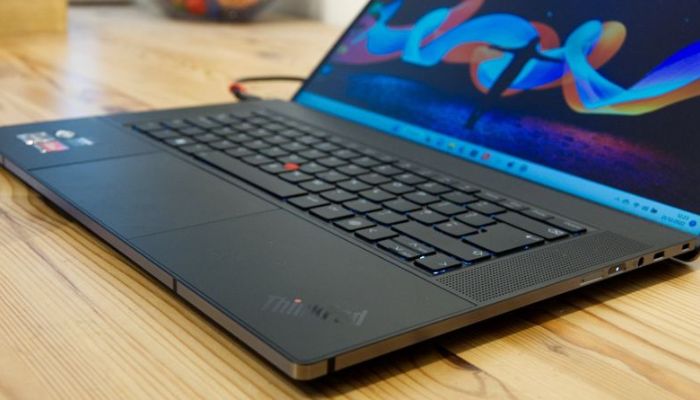
    Lenovo ThinkPad Z16 Gen 3

    Best laptops for programming

    The ThinkPad lineage continues with a modern twist. Renowned for the best keyboard on any laptop, the Z16 Gen 3 is a superb machine for programming and development.

    • Pros: Legendary ThinkPad keyboard comfort; sleek, modern design; robust AMD performance and solid battery life; excellent Linux compatibility.
    • Cons: The tall 16:10 display can take getting used to; premium price tag.
    • Ideal For: Corporate developers, sysadmins, and touch-typists who spend hours a day writing code.

    Key Considerations for Your Programming Needs

    Operating System: The Core of Your Workflow

    Your choice of OS is deeply personal and often tied to your tech stack.

    • macOS: A fantastic Unix-based environment that “just works.” Ideal for iOS, web, and Python development. Native support for Docker and most programming tools is excellent.
    • Windows: The most versatile OS, especially with the Windows Subsystem for Linux (WSL2), which provides a full Linux kernel. Essential for .NET, C#, and game development.
    • Linux: The purist’s choice for backend, cloud, and embedded systems development. Offers unparalleled control and is often faster for development tasks. Pre-installed on devices like Dell’s XPS Developer Edition and Framework laptops.

    Performance & Specs Deep Dive

    When selecting the best laptop for coding, don’t just look at the marketing. Understand the specs:

    • CPU Cores vs. Clock Speed: More cores are better for parallel tasks (compilation, VMs). Higher clock speeds are better for single-threaded performance.
    • RAM Speed and Type: Look for LPDDR5X RAM for better power efficiency and performance, which contributes to longer battery life.
    • Storage Speed: NVMe PCIe 4.0 (or newer) SSDs offer incredible load times for your IDE, OS, and projects.

    Display, Keyboard, and Battery Life

    These are the components you interact with all day, and they are critical for productivity and comfort.

    • Display: A 16:10 or 3:2 aspect ratio gives you more vertical space for code, meaning less scrolling. Look for high brightness (400 nits+) for working in various lighting.
    • Keyboard: A backlit keyboard with good key travel and a tactile response is a must. If possible, try before you buy.
    • Battery Life: Aim for a laptop that can last a full workday (8+ hours) on a single charge. Apple’s M-series chips currently lead in this department.
    Best laptops for programming

    Final Verdict and Buying Advice

    The search for the best laptops for programming in 2025 doesn’t have a single right answer, but it does have a clear front-runner for most.

    • For the ultimate balance of performance, display, and battery life, the Apple MacBook Pro 16-inch (M4) is unmatched.
    • For the best Windows-based all-rounder with a premium feel, the Dell XPS 15 is the one to beat.
    • For the forward-thinking developer who values repairability, the Framework Laptop 16 is in a class of its own.

    “Choosing from the best laptops for programming is a weighted balance of your budget, your primary tech stack, and your personal ergonomic preferences. Invest in the machine that not only compiles your code quickly but also makes the journey of writing it a pleasure. Choose wisely, and your laptop will be a trusted partner in bringing your ideas to life.”